
Payroll has a strange way of becoming stressful even when the process looks predictable.
Everyone gets paid every month. The dates are known. Salary structures are already defined. Attendance data exists. Leave records are available.
And yet, payroll week often turns into a rush.
One attendance correction comes in late. A leave adjustment is pending. An employee has an advance to account for. Someone joined mid-month. Someone else exited. Finance wants the final sheet. Employees are already asking when salaries will be credited.
The problem is rarely the salary calculation alone.
The real problem is everything that has to come together before that calculation can happen accurately.
That is where payroll automation changes the experience.
For businesses evaluating top payroll management software, the real value lies in reducing repetitive work, improving data consistency, and making salary processing easier to review and manage every month.
Why Payroll Becomes More Complicated as Teams Grow
Payroll works differently in a team of 15 than it does in a team of 150.
With a small workforce, HR or finance can often manage salaries through spreadsheets, manual attendance adjustments and a few internal approvals.
As the organisation grows, the number of variables grows too.
Each of these introduces another input that needs to be checked before payroll can be finalised.
The more systems these inputs come from, the more time teams spend reconciling them.
Payroll is Really a Data Coordination Process
At its core, payroll is not just about calculating salaries.
It is about bringing several workforce inputs together in the right sequence.
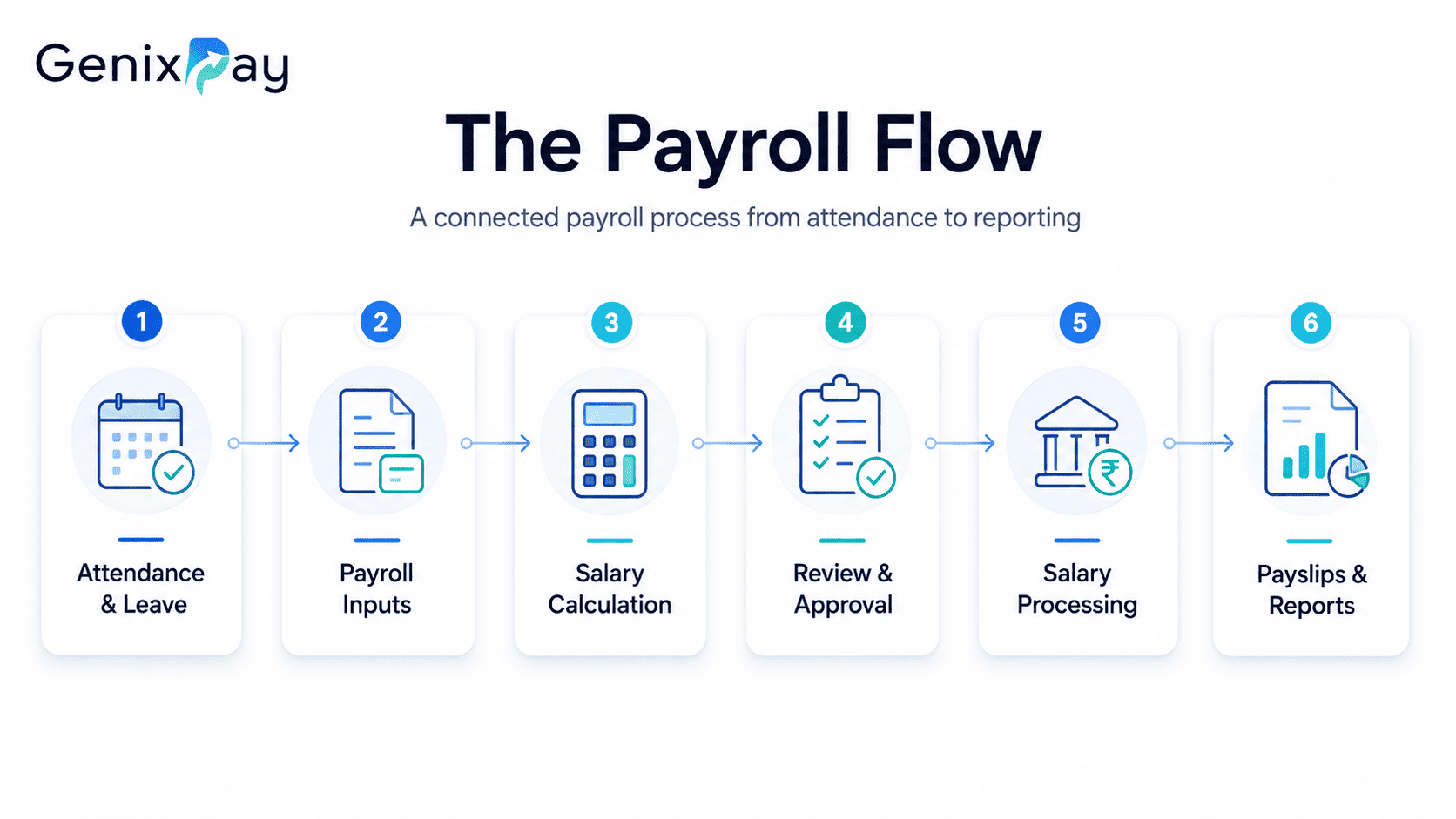
A typical salary cycle may involve:
If every item comes from a separate file or system, HR and finance teams have to manually assemble the complete picture.
That is why payroll automation matters.
It creates a more structured flow from employee data to salary processing.
Manual Payroll vs Integrated Payroll Software
| Payroll Activity | Manual Process | Automated Payroll Approach |
|---|---|---|
| Attendance Inputs | Collected separately | Pulled from connected attendance records |
| Leave Adjustments | Checked manually | Integrated into payroll workflow |
| Salary Calculation | Spreadsheet formulas | System-based calculations |
| Deductions & Advances | Entered manually | Structured employee-level records |
| Approvals | Email or offline confirmation | Defined approval workflow |
| Payslips | Prepared and shared individually | Generated digitally |
| Reporting | Compiled after payroll | Available from central payroll data |
The biggest improvement is not just speed.
It is consistency.
When payroll follows the same structured workflow every month, teams are less dependent on last-minute manual coordination.
1. Attendance Data Flows into Payroll More Cleanly
Attendance is one of the most common sources of payroll confusion.
Late regularisations, missing punches, unpaid leave and attendance corrections can all affect salary calculations.
In a disconnected setup, HR may export attendance data, clean it manually and then transfer it into a payroll sheet.
That creates extra work and another opportunity for mismatches.
With integrated HR and payroll software, attendance and leave records can become part of the payroll workflow itself.
The result is a simpler monthly process.
Instead of rebuilding attendance inputs from scratch, payroll teams start with data that has already been organised.
2. Salary Calculations Become More Structured
Payroll calculations often include much more than basic salary.
Different employees may have different salary structures, allowances, incentives, deductions, advances or reimbursements.
Spreadsheets can handle these calculations, but the process becomes harder to manage as the number of employees and variables increases.
Payroll software helps standardise these calculations.
It allows salary components to be defined within the system so that each payroll cycle follows a more consistent structure.
That does not mean human review disappears.
It means the review happens after the system has already organised the inputs.
3. New Joiners and Exits Become Easier to Handle
Mid-month changes are another major source of payroll complexity.
When employee records, joining dates and exit information already exist within the HR system, payroll can use that data without requiring another round of manual entry.
This is where integration between onboarding and payroll becomes particularly useful.
The employee journey does not have to restart in a new spreadsheet every month.
4. Advances, Deductions and Adjustments Stay Easier to Track
Small payroll adjustments can create large administrative headaches when they are not documented clearly.
If these are maintained separately, HR has to remember where the supporting information sits.
A payroll system creates a central record for such adjustments.
That makes it easier to understand why a particular salary amount changed and what needs to happen in the next payroll cycle.
For organisations searching for top payroll management software, this kind of traceability can be just as important as the calculation engine itself.
5. Approvals Become Less Chaotic
Payroll usually requires more than one person.
In a manual environment, this often means sending versions of spreadsheets back and forth.
One person updates a file. Another downloads an older version. A correction gets made in email.
Suddenly, nobody is completely certain which payroll sheet is final.
A structured payroll workflow reduces this problem by creating a clearer review and approval process.
Teams work from the same payroll data rather than multiple versions of the same file.
6. Payslips and Employee Records Become Easier to Access
Payroll does not end when salaries are processed.
When payslips and payroll histories are generated digitally, these records become easier to access and organise.
Employees can receive salary information more consistently, while HR teams spend less time responding to basic record requests.
This is a small change, but it can remove a surprising amount of repetitive administrative work.
What Should You Look for in Top Payroll Management Software?
Choosing payroll software should not begin with the longest feature list.
It should begin with your actual monthly workflow.
Ask where your team currently loses the most time.
The right platform should reduce those points of friction.
Look for these essentials:
The top payroll management software for one organisation may not be the same for another.
The better question is whether the system fits the way your workforce actually operates.
Why Payroll Works Better When It Is Part of HRMS
A standalone payroll tool can calculate salaries.
An integrated HRMS can give payroll better data to work with.
That difference matters.
When attendance, leave, onboarding, employee records and payroll are connected, information does not need to be repeatedly moved between systems.
That creates a much cleaner operational cycle.
Where GenixPay Fits In
GenixPay brings payroll into a wider HR management environment.
Its HRMS capabilities are designed to connect employee records, attendance, leave, payroll inputs and workforce reporting within a more structured workflow.
For growing organisations, this can reduce dependence on disconnected files and make monthly salary processing easier to manage.
The objective is simple.
Payroll should become a routine business process, not a recurring monthly emergency.
The Takeaway
Payroll will always require accuracy, review and accountability.
Automation does not remove those responsibilities.
What it can remove is the unnecessary administrative work around them.
When attendance, employee records, deductions, approvals and reporting are connected, payroll becomes easier to process and easier to understand.
That is the real difference automation makes.
It turns salary processing from a monthly scramble into a repeatable workflow.
“Still spending days pulling payroll data together every month?”
Bring attendance, employee records and salary processing into one connected workflow with GenixPay and make payday easier for everyone.